
Over the last year I have started programming more. I have a background in web design and front end development, but I wanted to learn more back end development and general purpose programming. I’m not sure the direction I want to take just yet, so during the evenings I am reading, learning and exploring. I wanted to do this exploration in a language that is mature enough where syntax and programming concepts I have just internalised aren’t going to change in 6 months, but not so old and bloated that the language has 5 different ways to do the same thing. Older language tend to have a less cohesive programming philosophy because they have existed through many different paradigm shifts in software development. Newer languages benefit from the mistakes older languages have made, but they also have a smaller community, so you want to get the balance right. There are of course older languages that have very strict and specific code design philosophies, but they tend to not be suitable for beginners who don’t want to be fighting the language at the very start of their learning.
Go gets this balance just right. I think as someone with web design experience and a general interest in tech, I can appreciate how Go helps to guide you as a beginner in a way that complete newbies may struggle to put into words or not even notice until they try a different programming language and have gained more experience. So I am going to outline what I think Go does well, and why it’s a great language for new developers.
Errors #
The verbose syntax of error handling in Go is an area of contention in the community. As a designer familiar with languages like JavaScript, I appreciate error handling in Go for a few reasons.
Firstly, the syntax makes you think about errors in the first place. I would argue most people, after familiarising themselves with programming concepts and writing some small programs, could write the happy path to some fairly complex programs. Programming is often about dealing with errors and deciding what to do when something goes wrong. When you are new to programming, your understanding of what can go wrong is pretty narrow. Go helps you learn how often things can go wrong in programming by returning an error that you should check.
Things can go wrong when you open a file, when you read a file, when you write to a file, when you unmarshal JSON, when you parse any text format, when you are running a server, when you query a database… Other languages don’t give you that impression, especially when you are a beginner watching tutorials and they show you something working but rarely the errors and how to handle them. I can speak from experience, in my introduction to Go I have read a fair bit about errors including formatting, logging, the new slog package, what is useful to include in an error message, how to write errors for debugging, how to write errors read by users and more. Handling errors and logging is not super interesting to me, it was however very accessible with Go to learn about them and not feel lost.
Secondly, “errors as values” is an easy concept to understand. In Go, if a function can go wrong, the last value will be an error, if it is not nil you can decide what to do with it. This concept is simple and no different to working with any other value in Go. Beyond checking if the error is nil, you can check its type, which is useful if you want to take different actions depending on the specific error you received.
All of this feels accessible to a beginner. If you told me before I looked at Go “the language lets you specify the type of an error so you can use if statements to take specific actions when you get that type of error”, I’d have a pretty good idea of errors in Go in 1 sentence.
Finally, errors help beginners understand how to structure programs. You’ll often hear phrases like “let the caller handle the error”, when you first start programming in Go; that can be pretty confusing, what or who is a caller? What do you mean by “handle”? Why should they, whoever the are, handle the error and not my function? Working through these questions helps you to understand how to structure programs as a whole.
The caller in your small program is likely the main function, but it could be another person using your code in their project, so of course they should be able to decide how to handle the error, since what is fatal in one program is a recoverable warning in another. Once you get into this way of thinking, returning simple variables and errors helps you to structure your code. You’ll start handling the edge cases at the beginning of your functions, returning errors with useful information that the caller might need, and then code the happy path with the nil error after that.
If your error could be 6 different types, that is likely a sign that you should refactor the code into smaller functions or question if all these different error types are necessary. Similarly, if you’re returning more than 2 values and an error, other than in specific cases, you should probably refactor or look at storing the information in a struct or other type. All of these lessons can be learnt by thinking about errors as a part of programming rather than a nuisance.
Syntax #
In general there is only one way to write code in Go (there are some exceptions, loops come to mind, but there are less options than in other languages). Once you learn an if statement, you internalise the structure and the concept as a whole. Luckily for you, that’s how they’re written in the simplest codebases and the largest monorepos. Go even enforces indentation when it comes to if/else statements and other code spacing rules with fmt . That can be jarring at first, especially if you have a preference for particular spacing, but it does keep code consistent. I think we underestimate how common it is to look at the shape of code to understand it at first. If you see two variables assigned to a function, and then an if statement directly below it, you don’t even need to read the code to take an educated guess that the if statement is checking the value of the second variable, the error. The shape of code helps beginners to feel comfortable with what they are looking at as they keep coming back to reading and writing Go.
res, err := f()
if err != nil {
	log.Fatal(err)
}Other code design features in Go help too, such as the rule that states the first word in the global scope must be a keyword like func or var. These subtleties can be overlooked, but when you are trying to learn to code, syntax errors are plentiful, so even if you can’t remember the syntax, these rules help you narrow things down - it’s either struct Container type or type Container struct, but not Container struct type. When you feel comfortable making these educated guesses, you can start to make guesses about other aspects of code, you start noticing patterns and realise why idiomatic code isn’t just rules for their own sake. If API’s follow a similar structure, you can start focusing on the logic and the syntax flows naturally.
You can tell this is important to the creators of Go. There are only 25 keywords - that’s less than Python and JavaScript, two languages that are often recommended to beginners. Obviously a language is not inherently easier to learn because it has less keywords, but it can help you feel “on your way” sooner. You can look through some of the largest open source Go projects on sites like GitHub and at least get the gist of each function. As a beginner, it’s nice that advanced code will be using the same keywords you learnt in the first few weeks. I think Go balances being clean and simple whilst not feeling like pseudo code. Whenever I have created small python scripts, I can tell the keywords are doing a lot of heavy lifting for me, so I feel like I am not really learning how things work. This can be a slippery slope down to writing assembly code if you care about the internals too much to begin with, at some point you do want to choose a language and stick with it, and that’s where I think Go got the right balance. It’s garbage collected but you still learn about pointers and therefore think about memory and how data is stored more than in interpreted languages. If you learn Go, you can easily learn Python if you want to feel less restricted or C if you want more control.
Standard Library #
The standard library
is feels comprehensive but not overwhelming. For example, when people ask which library to use to write a server in Go, many will recommend using the net/http package from the standard library. If you know the standard library well for areas like logging, building servers, testing, and so on, when you then want to turn to an external library or framework, you have a great foundation to understand where the benefits and drawbacks of that library are. It’s important for beginners to balance building things from scratch and using third party dependencies; never using other packages means the second they want to make something bigger than a to-do app, they may become discouraged by the amount of work it is. However, it’s great to know that you can extend the dependencies you use with the knowledge you learnt through using the standard library extensively at the beginning.
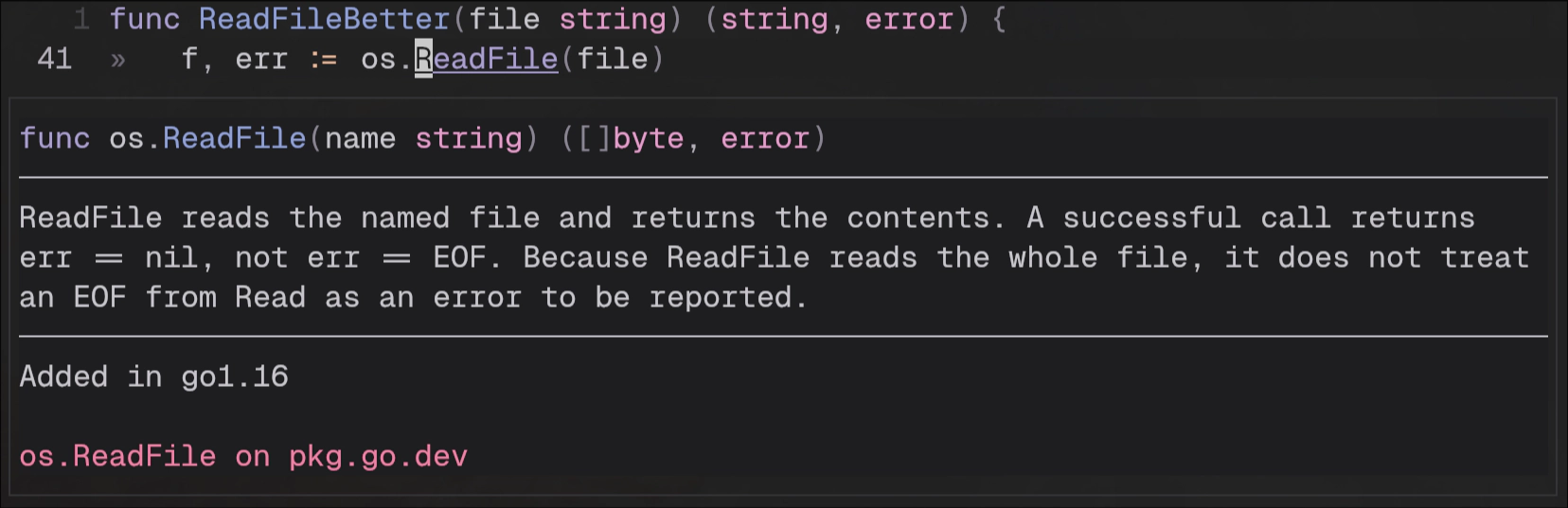
There are great websites giving clear examples of how to use the standard library, some I frequently use are Go by Example and Go Cookbook . The standard library itself is well documented. As someone who has worked with a lot of CSS libraries and templating languages, I am not used to using “go to definition”, but I use it all the time now, I hover over methods and functions to learn about them and what they return. When you first do this a lot of the information will go over your head until you encounter the reason the developers made the decisions they did, but it’s good practise either way, you cannot put the pieces together if you don’t start with the pieces in the first place.
Caveats #
As I mentioned earlier, Go is simple but it doesn’t hide everything from you, walking the line between low level and dynamic languages means the programmer must also walk that line, and beginners don’t have the conceptual framework to know that’s what they are doing. There are some concepts, particularly working with pointers and slices that are very confusing, especially if you have never encountered them before or you are a true novice with no experience coding.
As a beginner, you don’t have the knowledge to make an informed choice on your function returning a copy of a value or returning a pointer to a value. Go uses an ampersand to assign pointers like this x := &num and the underlying value is accessed like this fmt.Println(*x) - unless the pointer you have created is pointing to a struct, in that case Go performs auto-dereferencing, allowing for this fmt.Println(b.Title) to print the underlying value. You can use the deference operator if you want, but in this case it would be extra syntax to achieve the same thing.
Through research online, you may come across terms like “pass by value” and “pass by reference”, but Go doesn’t have pass by reference
in the classic sense that many languages with pointers have. When you use a pointer as an argument in a function, you are working on a copy of that pointer, it just so happens to be pointing to the same value as the original pointer and for the most part will behave as you expect - you will be able to see the changes outside of the function without returning that pointer. Things can go awry when you do something with that copy that increases the length of the value the pointer is pointing to beyond its capacity (this can happen easily with append, which is explained well in this blog post
).
These edge cases stump intermediate and advanced programmers, not just beginners. As someone learning Go, I often write small programs working with slices, pointers, maps and structs to try and work through the nuances in my head, printing the memory address of the pointer itself vs the value it is pointing to, tracking when these addresses change and working out why. All of this is time consuming, but not impossible for a beginner to learn. I also think it’s valuable to learn about memory up front as a beginner so it does not become a topic that you are afraid to broach. Memory is where your program lives, so understanding it even at a basic level is important.
Even though Go has these deviations, the process of learning the language has been enjoyable so far. I am moving on to building side projects in Go this year and feel prepared thanks to the documentation, the resources available online and the community surrounding the language.
Thank you for reading!
If you enjoyed this article, you can get updates from my RSS Feed to make sure you don't miss out any new posts.
If you have any questions, feel free to contact me.